
Contact Sales
Call center available M-F 9:00 - 4:00 US Eastern Time.
Case Studies

eziparts selected Xtreme Toolkit Professional with Visual C++ over many...
Docking Pane 2013 for Visual C++ MFC
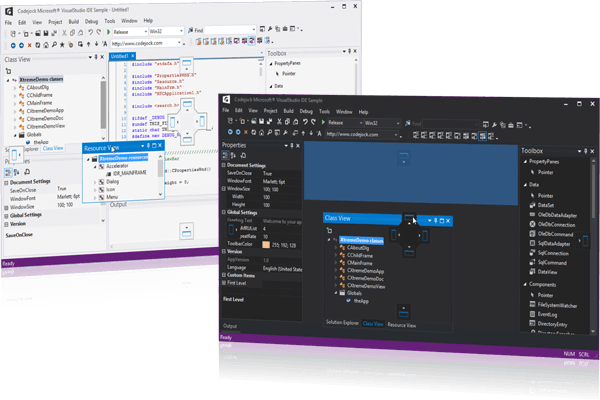
Docking Pane for Visual C++ MFC allows you to create fully customizable docking panes with a professional and modern interface. Windows developers can easily create tear off tabs and auto hide windows that allow for a more manageable application workspace.
Docking Pane is included with the Toolkit Pro for Visual C++ evaluation.
Product Features
Codejock Docking Pane provide several options to choose from including Visual Studio and Office Theme Support, Tear Off Tabs, Visio Style Docking, Sliding Auto Hide Windows, Pinnable Panes, Drag-n-Drop Positioning, Cascading Panes, Load and Save State, Full Customization and much more!
General Features
- Nested Grouping
- Visual Studio "Whidbey" Style
- Visual Studio Docking Stickers
- Tear Off Tabs
- Splitter Tracker
- Visio Style Docking
- Sliding Auto Hide Windows
- Pinnable Panes
- Float and Dock Panes
- Auto-Hide Pinnable Floating
- Hidden Client
- Drag-n-Drop Pane Positioning
- Hide and Show Panes
- Caption Menu Button
- Cascading Panes
- Caption Direction
Theme Support
- Office 2010
- Office 2007
- Office 2003
- Visual Studio 2010
- Visual Studio 2008
- Visual Studio Whidbey
- Visio
- Gripper
- Themed Floating Panes
- Splitter Style
Load and Save State
Tab Customization
- Static Frame
- Show Icons
- Hot Tracking
- Bold Selected
- Tab Position
- Tab Layout
- Tab Appearance
- Tab Color
- Margins
- Rotated Tabs
Auto Hide Panels
Supported Environments
Visual C++ 6.0
Visual C++ .NET 2002 (7.0)
Visual C++ .NET 2003 (7.1)
Visual C++ .NET 2005 (8.0)
Visual C++ .NET 2008 (9.0)
Visual C++ .NET 2010 (10.0)
Visual C++ .NET 2012 (11.0)
Supported Operating Systems
Windows 8, Windows 8 x64
Windows 7, Windows 7 x64
Vista, Vista x64
Windows XP, Windows XP x64
Windows NT 4.0, 2000, 2003, 2008
Windows 95, 98, 98SE, Me
Minimum Requirements
Visual C++ 6.0
Windows 95/NT
Nested Grouping
You can use Xtreme DockingPane to group windows in a tab style arrangement and display them in any arrangement docked to any side of your application workspace. The docking panes can be grouped together or docked inside one another to make the best use of available workspace.
Whidbey Style Alpha Docking Context and Docking Stickers
Codejock Software's Xtreme DockingPane provides support for Visual Studio "Whidbey" docking context and docking stickers. While dragging a docking pane in your application, the alpha docking context will shade the area that the docking pane can occupy. Docking stickers will visually display where the docking pane can be docked by displaying stickers that point to the appropriate locations.
Visual Studio 2010 Style Alpha Docking Context and Docking Stickers
Codejock Software's Xtreme DockingPane provides support for Visual Studio 2010 style docking context and docking stickers. While dragging a docking pane in your application, the alpha docking context will shade the area that the docking pane can occupy. Docking stickers will visually display where the docking pane can be docked by displaying stickers that point to the appropriate locations.
Detachable Tab Windows
You can use Xtreme DockingPane to create tabbed dockable windows that you can locate along any side of your application workspace. These tabbed windows allow you to drag and "Tear Off" any of the individual tabs to create new windows that can either float or dock along the side of your application workspace. You can also drag and drop to combine windows which will create a new tab in each dockable window. An outline is drawn to depict where your window will be located when you tear off or combine.
Docking Pane Splitter Tracker
Xtreme DockingPane allows you to change what your docking panes look like when they are resized. You can use a splitter tracker that will draw an outline to depict the new size of your docking pane window or you can resize your docking panes in "real-time," instantly seeing how your new docking pane will look.
WYSIWYG DotNET and Visio Style Docking
Codejock Software's Xtreme DockingPane gives your application the power of WYSIWYG (what you see is what you get) style docking panes. You can create docking and splitting windows that are similar to Visual Studio .NET or Microsoft Visio. This gives you the ability to dock your windows to any side of your application's desktop while a visual clue is displayed representing where the docking pane will be positioned.
Docking Pane Auto Hide Delay
Xtreme DockingPane allows you to change the speed at which your docking panes are displayed and auto hidden. You can easily change the delay of the auto hide windows as fast or slow as you want so your windows hide/show at the perfect speed.
Pinnable Panes
Codejock Software's Xtreme DockingPane allows you to pin to your hidden panes allowing them to stay visible. You can also press the pin to easily hide panes to allow for more area available to your workspace.
Float and Dock Panes
Codejock Software's Xtreme DockingPane provides support for floating and docking window panes. You can easily float your docked pane or dock your floating pane to any side of your applications workspace area, or to any side of any docking pane!
Docking Pane Pinnable Floating Frames
Xtreme DockingPane allows you to pin your floating panes allowing them be hidden/visible. You can press the pin to easily hide floating panes to allow for more area available to your workspace.
Docking Pane Hide Client
Xtreme DockingPane allows you to hide the client area of your application so that your docking panes can occupy the entire application workspace.
Drag-n-Drop Pane Positioning
Codejock Software's Xtreme DockingPane gives you the flexibility of drag and drop positioning. You can easily drag and drop any docking pane or tab onto any dockable area such as your application workspace or another docking pane.
Hide and Show Panes
Codejock Software's Xtreme DockingPane allows you to easily hide and show panes to optimize your application workspace. You can hide your docked or floating panes at runtime easily by pressing the small ‘x’ located at the upper right side of the caption area. You can also easily add commands to display and active your panes thru your application menu.
Pane Caption Menu Button
Codejock Software's Xtreme DockingPane allows you add a button to the caption of your panes so that you can display a custom menu. You do not have to display a menu, you can display whatever you want under the menu button. The menu button allows you to provide menu options that apply to the pane in menu that is easy find and use.
Visual Studio Style "Cascading" Panes
Codejock Software's Xtreme DockingPane provides you with the "cascading" pane navigation functionality seen in Visual Studio. When the "Maximize" button is pressed on a pane, it will cause the pane to occupy the entire area of all adjacent panes. Then the "Maximize" button will change to a "Restore" button for the currently expanded pane. When the "Restore" button is pressed, then all the panes are returned to their original size and location. This provides grouping functionality to pages that are not group together.
Caption Direction
Codejock Software's Xtreme DockingPane allows you to change the direction that the docking pane caption will be displayed. The pane captions can be displayed vertically or horizontally. This allows you to display the caption in the direction that best fits your application. You have the option so always display the captions vertically or horizontally, to change direction by position which will display the caption horizontally if the pane is docked to the top or bottom of the application and display the caption vertically if the pane is docked to the left or right of the application, and you can change the direction by the size of the pane which will display the caption horizontally if the pane's width is smaller that it's height and it will be displayed vertically if the pane's height is smaller than the pane's width.
Office 2010 Theme Support
Codejock Software's Xtreme DockingPane provides your application with full Office 2010 theme support that gives your application the closest, most exact Office 2010 style themes of any 3rd party tool available today. Office 2010 is already built in, so you don't have to spend any extra time on this. This allows you the ability to stay ahead of the competition with the latest in application GUI design.
Office 2007 Theme Support
Codejock Software's Xtreme DockingPane provides your application with full Office 2007 theme support that gives your application the closest, most exact Office 2007 style themes of any 3rd party tool available today. Office 2007 is already built in, so you don't have to spend any extra time on this. This allows you the ability to stay ahead of the competition with the latest in application GUI design.
Office 2003 Theme Support
Codejock Software's Xtreme DockingPane provides your application with full Office 2003 theme support that gives your application the closest, most exact Office 2003 style themes of any 3rd party tool available today. Office 2003 is already built in, so you don't have to spend any extra time on this. This allows you the ability to stay ahead of the competition with the latest in application GUI design.
Visual Studio 2010 style Theme Support
Codejock Software's Xtreme DockingPane provides your application with full Visual Studio 2010 style theme support that gives your application the closest, most exact Visual Studio 2010 style themes of any 3rd party tool available today.
Visual Studio 2008 style Theme Support
Codejock Software's Xtreme DockingPane provides your application with full Visual Studio 2008 style theme support that gives your application the closest, most exact Visual Studio 2008 style themes of any 3rd party tool available today.
Visual Studio Whidbey style Theme Support
Codejock Software's Xtreme DockingPane provides your application with full Visual Studio Whidbey style theme support that gives your application the closest, most exact Visual Studio Whidbey style themes of any 3rd party tool available today.
Visio Theme Support
Codejock Software's Xtreme DockingPane provides your application with full Visio theme support that gives your application the closest, most exact Visio style themes of any 3rd party tool available today.
Gripper Theme Support
Codejock Software's Xtreme DockingPane provides built in theme support for a grippered appearance. You can choose this theme for a more classic windows appearance, or choose from several pre-defined theme styles created for Xtreme DockingPane.
Docking Pane Themed Floating Frames
Xtreme DockingPane allows you to use themed floating frames for your floating docking panes. Xtreme DockingPane will automatically use themed floating frames that match the currently set Docking Pane theme.
Splitter Styles
Xtreme DockingPane provides you with many different themes that you can apply to the splitter of the docking panes. This will allow you to completely theme your docking panes by matching the splitter theme with the pane's theme.
Save and Load Docking Pane Layout to/from System Registry
Xtreme DockingPane allows you to easily save and load your Docking Pane layout to and from the system registry. Only two lines of code are required to load and save your Docking Pane layout. Xtreme Docking Pane will save the status, location, and preferences of each individual docking pane
Save and Load Docking Pane Layout to\from String
Xtreme DockingPane allows you to easily save and load your Docking Pane layout to and from a String. Only two lines of code are required to load and save your Docking Pane layout. Xtreme Docking Pane will save the status, location, and preferences of each individual docking pane. Layouts can easily be saved to a file so each individual user can have their own custom layout.
Some applications have multi user access. It can be useful to store a layout for each user in a personal file instead of the registry.
Static Frame
Xtreme DockingPane allows you to add a static frame around the entire TabControl. You can easily add or remove the static frame via code.
Show Tab Icons
Xtreme DockingPane allows you to easily show/hide icons in your tab buttons.
Hot Tracking
Xtreme DockingPane allows you to easily enable/disable Hot Tracking. When you move the mouse cursor over your tabs, they will become "Hot" when Hot Tracking is enabled. This allows you to easily see which tab the mouse cursor is over.
Bold Selected Tabs
Xtreme DockingPane allows you to easily enable/disable Bold Selected tabs. When you click on a tab, the currently selected tab caption is displayed in bold type, making it easy to see which tab is selected.
Tab Position
Xtreme DockingPane allows you to position the tabs on the top, left, bottom, or right with a single line of code. You can change the position of the tabs at any time in your program.
Tab Layout
Xtreme DockingPane allows you to change the layout of your tabs with a single line of code. The tabs can be in a compressed, fixed, auto size, size to fit layout, multi-row, or rotated. You can change the layout of the tabs at any time in your program.
Tab Appearance Styles
Xtreme DockingPane allows you to easily change the appearance of your tabs. You can choose from several built in appearances.
Tab Color Styles
Xtreme DockingPane allows you to fully customize the appearance of your tabs by applying color styles. For your convenience, you can choose from several built in color styles. Color styles can be used with Appearance styles to give your application a unique professional look. For example, your tabs can have a Visual Studio appearance using Office 2003 colors.
Tab Margins
Xtreme DockingPane allows you to manipulate the margins of the components that make up the tabs. You can change the button, header, client, and control margins of the tabs. The button margin is the area in the tab button surrounding the tab caption, the header margin is the area surrounding the tab buttons, the client margin is the area surrounding the client (area inside the tabs), and the control margin is the area surrounding all of the tabs and tab client area.
Rotated Tab Layout
Xtreme DockingPane allows you to change the orientation of the pane tabs. Depending on the position of the tabs, you can give the tab control a totally different look. You can display tabs "rotated" from their natural position which will cause the caption of the tabs displayed on the top or bottom to be displayed vertically, and tabs displayed on the left or right to be displayed horizontally.
Fully Customizable Auto Hide Panels
Xtreme DockingPane allows you to customize the appearance of your docking pane auto hide panel in the same way you can customize the docking pane tabs. You can use a completely different appearance and color scheme in your auto hide panel and normal docking pane tabs. When your docking panes are visible they can be using a totally different appearance, color scheme, layout, position, margins, etc.. than when the panes are hidden and displayed in the auto hide panel. For example, your docking pane tabs can use the Office style tabs when the docking pane is visible, and they can use Excel style tabs when displayed in the auto hide panel.


