Toll Free: (877) 723-1442 U.S. and Canada
Xtreme Syntax Edit
Product Information
Product Bundles
Individual Products
More Information
Corporate Partners
Customer Spotlight
Contact Sales

Call center available M-F 9:00 - 6:00 US Eastern Time.

U.S. and Canada
(877) 723-1442

International
(517) 625-5729

Email

Win64 Ready

Win64 Ready!

Overview  |   First  |  Previous  |   Next  |  Last

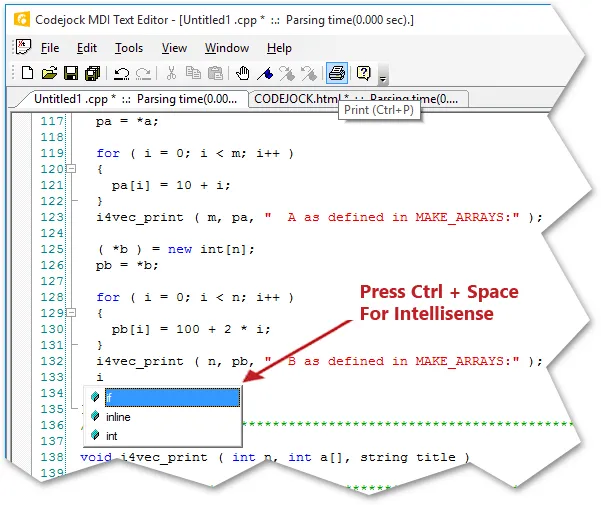
Visual Studio .NET Style Intellisense Help

Using various configuration files such as a C++ configuration file you can add intellisense to the syntax editor. Using the configuration file you can specify which "keywords" will use the intellisense feature. To active intellisense press Ctrl + Space anytime during editing.
Microsoft, Visual Studio, and the Visual Studio logo are trademarks or registered trademarks of Microsoft Corporation in the United States and/or other countries. Other products and/or company names may be trademarks or registered trademarks of their respective owners.