

Command Bars
for v24.3.0
Command Bars for provides Windows developers with comprehensive, fully customizable menus, toolbars, ribbon and MDI tab windows to give your application a professional and modern interface.
Command Bars is included in Toolkit Pro for
Key Features
Codejock Command Bars for provides several options to choose from including Office Style Ribbon, Visual Studio and Office Theme Support, Tabbed and Transparent Toolbars, MDI Tab and Gallery Controls, Accelerators / Hot Keys, Load / Save State, full Customization and much more!
Command Bars is included with the Toolkit Pro for evaluation.
Modern Office Themes
Create a polished, modern Office-inspired interface with built-in themes, accent colors, backstage views, background accents, and clean application style command bar layouts.

Modern Office Themes
Give your application a modern Office-inspired command bar interface with built-in theme support, selectable accent colors, and multiple base color options for a polished, current UI.

Modern Backstage Views
Add modern backstage views that provide space for document tools, settings, and related commands without cluttering the main interface or overwhelming the user.

Office Background Accents
Customize the title bar with built-in Office style background images, giving your application a more personalized and visually distinctive command bar presentation.

Office Application Colors
Office Application Style includes several different themes. The themes included are the Access, Excel, One Note, Outlook, Power Point, Publisher and Word styles.

Office Gray Styles
Use neutral Office gray style variations to give command bars a clean, balanced appearance with light and dark gray options for a more understated interface.

Office v14.0 Style
Give your application an Office v14.0-inspired interface with built-in styling for menus, toolbars, command bars, and ribbon-era UI elements.

Office v14.0 Ribbon Colors
Apply Office style ribbon colors across menus and toolbars, giving your application a coordinated ribbon-inspired appearance without custom theme work.

Office v12.0 Style
Apply Office v12.0 style command bar themes to create a polished ribbon-era interface with familiar colors, controls, and Office-inspired visual styling.

Classic Office v11.0 Style
Support classic Office v11.0 style interfaces with built-in command bar themes for applications that need a familiar pre-ribbon Office appearance.

Classic Office v10.0 Style
Support classic Office v10.0-style command bars with built-in styling for traditional menus, toolbars, and Office-inspired controls.

Classic Office Color Matching
Match Office v10.0 style colors to the active Windows theme or color scheme, helping command bars and menus blend naturally with the user’s desktop environment.

Classic Office v9.0 Style
Support older Office v9.0-style command bars with built-in styling for applications that need a familiar classic Office interface.
Visual Studio Themes
Give your application a familiar Visual Studio style interface with built-in themes that match multiple Visual Studio generations, including status color support.

Modern Visual Studio Themes
Give your application a modern Visual Studio-inspired interface with built-in theme support for newer Visual Studio styles, helping command bars, menus, and toolbars feel familiar and professionally integrated.

Visual Studio Status Colors
Use Visual Studio-style status colors to highlight application state through the status bar and window border. Define colors for open, closed, debug, or any custom workflow state.

Light and Dark Themes
Apply a clean Visual Studio style light or dark theme to your command bars, menus, and toolbars with built-in support that helps your application match the look of modern Visual Studio environments.

Blue Theme
Give your application a Visual Studio Blue-style interface with built-in command bar styling for a familiar, development-focused user experience.
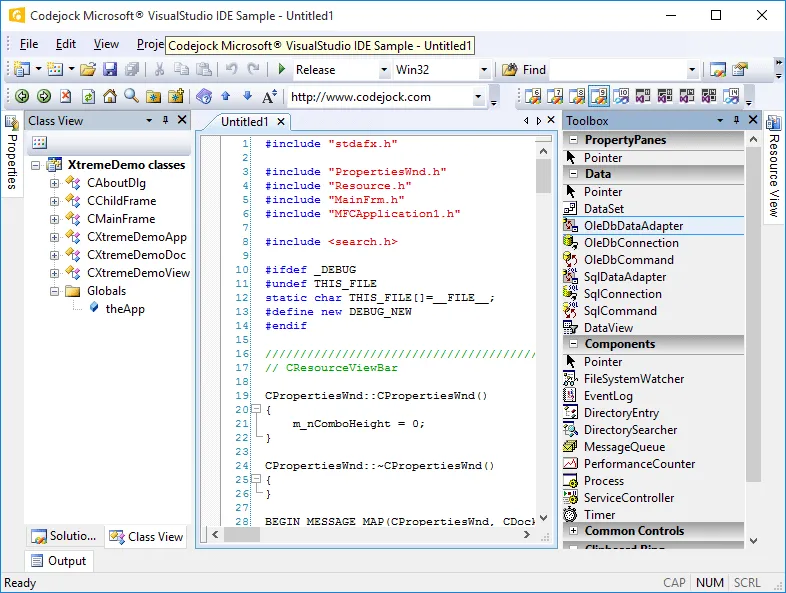
Classic v9.0 Style
Match the classic Visual Studio v9.0 IDE appearance with built-in command bar styling for applications that need a familiar developer-focused interface.

Classic v8.0 Style
Apply a classic Visual Studio v8.0 IDE-style theme with built-in styling for menus, toolbars, and related command controls.

Classic v7.1 Style
Support older Visual Studio v7.1-style interfaces with built-in classic IDE theme support for applications that need a familiar development environment look.
Windows Themes
Match the Windows desktop experience with built-in command bar themes for modern Windows interfaces, along with classic Windows 7 and Windows XP-inspired styles.

Modern Windows Theme
Match modern Windows desktop styling with built-in command bar and window title theming, including support for modern Windows style layouts and customizable accent colors.

Windows Blue Style
Apply a familiar Windows Blue-inspired command bar style for applications that need to align with established Windows desktop environments.

Classic Windows Style
Support classic Windows XP-inspired command bars with built-in styling for applications that need a familiar legacy Windows desktop appearance.
Additional Theme Support
Extend your interface with custom colors, frame shadows, themed dialog frames, and vector icon support for sharper, more flexible command bar styling.

Vector Icons
Use scalable vector icons across command bars and ribbons for crisp rendering at different screen resolutions and DPI settings without maintaining multiple bitmap sizes.

Dialog Frame Theme
Extend command bar theming to dialog frames so application windows, borders, captions, and dialogs maintain a consistent visual style.

Frame Shadow
Add themed frame shadows that help windows stand out, improve visual focus, and give supported command bar themes a more polished desktop appearance.

Custom CommandBar Colors
Customize command bar colors to match your application branding or choose from predefined appearance options for a more tailored interface.
Office Style Ribbon
Create full Office style ribbon interfaces with ribbon groups, gallery controls, smart layout, screen tips, backstage views, Aero effects, and customization support.

Ribbon Bar Control
Create Office-style ribbon interfaces with command groups, enhanced layout behavior, and familiar ribbon controls that help organize application features more effectively.

Ribbon Customization
Just like toolbars and menus, the ribbon bar provides flexible customization options that allow users to adjust the application so it suits their needs best.

Backstage View
Provide an Office-style backstage area for document-level tasks such as printing, saving, and settings, giving users a dedicated space for application-wide commands.

Ribbon Groups
Organize ribbon commands into logical groups with captions that make related tools easier to identify, browse, and use within the ribbon interface.

Group Option Button
Add option buttons to ribbon group captions to open related dialogs or trigger custom actions tied to the controls within that group.

Smart Layout
Use smart ribbon layout behavior to make efficient use of available space, automatically adjusting command presentation and image sizes as the ribbon changes width.

Gallery Control
Display visual or text-based choices in a toolbar, ribbon group, or popup menu using an Office-style gallery control with scrollable item collections.

Expandable RibbonBar
Allow the Office-style Ribbon Bar to collapse when users need more workspace and expand again when command access is required.

Variable Font Size
Support a wide range of font sizes in Ribbon Bar and Command Bars, with optional icon resizing to keep controls visually balanced as text size changes.

Screen Tips
Improve command discovery with ScreenTips that provide keyboard access guidance and help users understand available ribbon and command bar actions.

Glass Effect
Apply Aero-style glass effects on supported Windows versions, giving Ribbon Bar and Command Bars a translucent interface that integrates with the desktop theme.

System Button Menu
Group core application commands into a single Office-style system button menu, creating a clear entry point for common file and application actions.

Right-To-Left (RTL) Ribbon Support
Display the Ribbon Bar in right-to-left layouts for RTL languages, with multi-language support to help applications serve a broader international user base.
Accelerators/Hot Keys
Improve command access with shortcut keys, key tips, and user-defined accelerators that help users navigate menus and toolbars faster from the keyboard.

Shortcuts
Assign keyboard shortcuts to command bar controls and automatically display shortcut combinations beside menu commands for faster access.

Shortcut Key Tips
Show accelerator tips beside toolbar buttons so users can discover and use keyboard shortcuts while navigating commands more efficiently.

User Defined Accelerators\Shortcuts
Let users create custom shortcut keys for application commands at runtime, improving productivity by allowing each user to tailor command access to their workflow.
Image Attributes
Customize command images with alpha icon support, visual image management, normal, hover, faded, and disabled states, plus subtle shadows for polished menus and toolbars.

Faded Menu and Toolbar Icons
Display faded menu and toolbar icons until the user hovers over them, creating a subtle visual effect that highlights active commands on mouseover.

Disabled Icons
Show disabled commands with grayed menu and toolbar icons so users can quickly identify which actions are currently unavailable.

Icon Shadows
Add mouseover shadows behind menu and toolbar icons to give commands more depth and create a subtle three-dimensional highlight effect.

Alpha Icon Support
Use smooth 32-bit alpha icons in menus and toolbars for cleaner blending, semi-transparent edges, and a more polished command bar appearance.


Normal, Hover and Disabled Icons
Define normal, hover, and disabled icon states for menu and toolbar controls. Command Bars can generate hover and disabled images automatically or use custom images you provide.

Command Bar Image Manager
Add, edit, copy, delete, and manage command bar images at design time with Image Manager support for alpha icons, generated hover and disabled states, and multiple icon sizes.
Toolbar and Status Bar Layout
Create flexible command bar layouts with custom commands, visual design tools, multi-language support, dockable toolbars, status bars, MDI buttons, and Office-style layouts.

Commandbar Actions
Commandbar actions eliminate the need to use the update notification\event to update\change the state and properties of an item that appears multiple places in your menus and toolbars. This also makes it easy to localize all the control with a single line of code. In the diagram below, the "Menu Item," "Toolbar Item" and "User Customized Item (user created toolbar)" all share the same "Item Action." When you modify the properties of the action it will update all occurrences of the item.

Loading a Command Bar from a File
The Command Bars Designer Studio allows you to visually create your command bar or ribbon. The command bar is saved to a file and only one line of code is needed to load the file in your application. With the Designer Studio, you can easily add/edit/delete accelerators, controls, icons, and toolbars.

Multi-Language Support
Command Bars allows you to easily support multiple languages via a single line of code. Command Bars supports up to 32 different languages, including Right-To-Left (RTL) support.

Popup Toolbars
Command Bars allows you to display a normal popup menu as a popup toolbar.

Dockable Toolbars
Command Bars allows you to drag-n-drop your toolbars and dock them to any border of your application or you can have a floating toolbar.

Command Bar MDI Buttons
Command Bars allows you to easily add/remove MDI buttons to/from your command bar. This allows you to control how your MDI Child windows will be resized.

Office Style Toolbars
Command Bars gives your Windows application toolbars a professional modern appearance similar to many popular Microsoft® products. You can choose from several pre defined themes. Microsoft® Office 2003 Style Toolbars Microsoft® OfficeXP Style Toolbars

Control Popup Alignment
Command Bars allows you to easily change the direction a popup control will be displayed. You can make the popup be displayed to the left or right, which is the default behavior. Control popup that is displayed to the left

Luna Colors
Command Bars allows you to enable/disable Luna colors in your command bar. Office 2003 theme with Luna colors disabled Office 2003 theme with Luna colors enabled

Tab Workspace Luna Colors
Command Bars allows you to enable/disable Luna colors in the tab workspace. Tab workspace with Luna colors disabled Tab workspace with Luna colors enabled
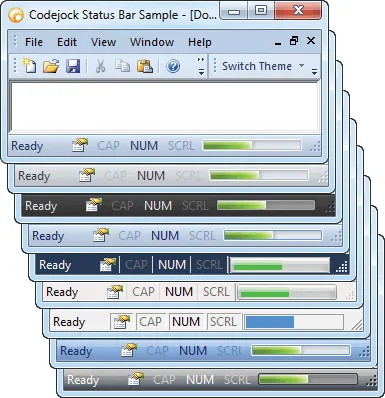
Status Bar Layout
Add a themed status bar with customizable panes for messages, indicators, and application state. Display useful details such as Caps Lock, Scroll Lock, Num Lock, or custom status information.

Save and Load Layouts from the Registry
Save and restore command bar layouts using the system registry. User customizations for menus, toolbars, and command layouts can be preserved between sessions.

Save and Load Layouts from Other Formats
Save command bar layouts outside the registry using strings, XML, or other custom storage formats for per-user settings, shared profiles, or application-managed configuration.
Toolbar Buttons
Add rich toolbar controls including standard buttons, split buttons, popup buttons, combo boxes, edit boxes, toggle buttons, and multiple button styles.

Command Bar Button Styles
Customize command bar button presentation with caption-only, icon-only, or caption-and-icon styles. Let Command Bars choose the best display style automatically or define the layout yourself.

Standard Button Control
Add standard button controls to command bars, toolbars, and menus with built-in theming that automatically matches the active Command Bars visual style.

Split Button Popup Control
Add split button popup controls that combine a primary command with a drop-down list of related actions. Selected commands can be reused from the button area and styled with the active theme.

Button Popup Control
Add themed popup button controls to command bars for menus, options, or grouped commands that open from a toolbar or command surface.

Combo Box Control
Add themed combo box controls directly to command bars so users can choose from predefined values without leaving the toolbar interface.

Edit Box Control
Add themed edit box controls to command bars for search fields, user input, command values, or other text-entry scenarios within the toolbar.

Toggle Buttons
Use toggle buttons to show on/off command states in menus and toolbars. Menu items can display check marks while toolbar buttons show a selected state.
Dynamic Customization
Let users customize commands at runtime with drag-and-drop editing, command modification, dynamic toolbar changes, user-defined toolbars, and configurable options.

Drag and Drop CommandBar Items
Let users rearrange command bar items by dragging commands between menus and toolbars from the customization dialog, making workspace changes quick and intuitive.

Edit, Copy and Delete Commands
Give users runtime control over toolbar and menu commands with options to edit, copy, delete, and modify items while limiting customization to the command bars you allow.

Dynamic Command Updates
Add or remove toolbar commands dynamically so users see the commands they need without unnecessary clutter or confusion in the application workspace.

Toolbar Customization
Create and modify toolbars with a clean customization interface that helps users organize commands and tailor the workspace to the way they work.

User-Defined Toolbars
Allow users to create custom toolbars at runtime so they can personalize the application interface and keep frequently used commands within easy reach.

User Defined Command Bar Options
Command Bars allows users to specify which command bar options they want to use. Users can specify how the menus are displayed, if large icons are used, menu animation, and accelerator tips in your application at run-time. This allows users to obtain a custom look and feel that best suits them.
Toolbar Options
Control toolbar behavior with large or small icons, text below icons, tooltips, show and hide options, closeable toolbars, grippers, tabular layouts, and transparency.

Large and Small Icons
Let users switch between large and small toolbar icons to balance workspace efficiency with readability. Icon sizes can be configured to match the needs of each application.

Toolbar Text Labels
Display text below toolbar icons for clearer command identification. This option can be enabled for individual toolbars or applied across all toolbars.

Toolbar Tooltips
Show helpful tooltips when users hover over toolbar buttons, or disable them when a cleaner interface is preferred.

Show and Hide Toolbars
Allow users to show, hide, reset, or customize toolbars from a command bar context menu, giving them control over which tools appear in their workspace.

Closeable Toolbars
Control whether specific toolbars can be closed or hidden. Keep important command bars persistent while allowing optional toolbars to be dismissed.

Tabbed Toolbars
Group multiple toolbar categories into a tabbed toolbar interface, reducing clutter while keeping related commands easy to access from a compact tab layout.

Transparent Toolbars
Support Windows style composition effects with transparent toolbar rendering for applications that need a glass-like desktop appearance.
Menu Customization
Build flexible menu experiences with intelligent menus, animations, tear-off menus and toolbars, popup menus, and context menus for application-specific commands.

Intelligent Menus
Create intelligent menus that keep less-used commands hidden until users expand the menu with a chevron button, helping reduce clutter while keeping advanced commands accessible.

Menu Animations
Control how menus appear with built-in animation effects such as unfold, slide, fade, random, or none, giving your application a smoother and more polished menu experience.

Tear-Off Menus and Toolbars
Allow users to tear off menus or toolbars and float them in separate windows, creating a more flexible workspace that can be arranged around individual preferences.

Popup Menus
Add themed popup menu controls to command bars, giving users quick access to related commands while maintaining a consistent visual style across the application.

Popup Context Menus
Display context menus anywhere in the application, using existing menus, command bars, or temporary popup menus that can change based on where the user right-clicks.
MDI Interface
Create advanced MDI interfaces with tear-offs, tabbed documents, tab groups, themed client backgrounds, auto-themed tabs, tab colors, reordering, and frame options.

MDI Tear-Offs
Detach MDI child windows so users can view and work with multiple documents at the same time, including across multi-monitor desktop environments.

MDI Tabbed Interface
Add a professional tabbed MDI workspace with themed tabs that match the active Command Bars style. Enable or disable tabbed documents through code and choose from built-in or custom themes.

Tabbed Workspace Groups
Create horizontal or vertical tab groups within the workspace. Users can move tabs between groups with drag-and-drop or through command bar actions.

Themed MDI Client Background
Apply a themed MDI client background that matches the active Command Bars style, or disable it to use the application form background color instead.

MDI Tabs Auto Theme
Automatically match MDI tab styling to the active Command Bars theme, or disable auto theming to use a different visual style for the tab workspace.

Tab Colors
Assign custom colors to individual tabs in the workspace, making documents, categories, or important items easier to identify.

Tab Reordering
Allow users to reorder tabs by dragging them to a new position, with optional control over whether tab reordering is enabled.

Tab Buttons
Control which tab workspace buttons are visible, including close buttons, navigation arrows, both, or neither, depending on your application layout.

Static Frame
Add or remove a static frame around the tab control to give the workspace a more defined border and visual structure.
Tab Customization
Customize tabbed interfaces with icons, hot tracking, selected tab emphasis, position, layout, rotation, appearance, colors, borders, and margin settings.

Tab Icons
Show or hide icons in tab buttons to create a cleaner workspace or provide additional visual cues for each document, view, or tabbed item.

Tab Hover Tracking
Highlight tabs as users move the mouse over them, making it easier to see which tab is currently under the pointer before selecting it.

Bold Selected Tabs
Display the selected tab caption in bold text so users can quickly identify the active document or workspace tab.

Tab Position
Place tabs on the top, bottom, left, or right side of the workspace, with the flexibility to change tab position through code.

Tab Layout
Choose from multiple tab layouts, including compressed, fixed, auto-size, size-to-fit, multi-row, and rotated arrangements for different workspace needs.

Rotated Tab Layout
Display rotated tabs in the workspace to support side-positioned layouts or applications that need a more compact tab arrangement.

Tab Appearance Styles
Apply built-in tab appearance styles inspired by Excel, Office, Visual Studio, flat layouts, and other familiar interface designs.

Tab Color Styles
Customize tab colors with built-in color styles, including Office, Windows, and Visual Studio-inspired options for a more distinctive tabbed workspace.

Tab Borders
Control the border around the tab client area with full frame, single-line, or borderless options to match the desired workspace appearance.

Tab Margins
Adjust tab margins for buttons, headers, client areas, and the overall control to fine-tune spacing and layout throughout the tab workspace.
Supported Platforms and Environments
Broad compatibility across Visual Studio, Windows desktop, and Windows Server releases — from modern environments to legacy deployments.
Development Platform
Development environments
- Visual Studio 2022
- Visual Studio 2019
- Visual Studio 2017
- Visual Studio 2015
- Visual Studio 2013
- Microsoft Access
- Visual Studio 2012
- Visual Studio 2010
- Visual Studio 2008
- Visual Studio 2005
- Visual Studio .NET 2003
- Visual Studio .NET 2002
- Visual Basic 6.0
Windows Desktop
Client operating systems
- Windows 11
- Windows 10
- Windows 8.1
- Windows 8
- Windows 7
- Windows Vista
- Windows XP
- Windows Me
- Windows 2000
- Windows 98 SE
- Windows 98
- Windows 95
Windows Server
Server environments
- Windows Server 2022
- Windows Server 2019
- Windows Server 2016
- Windows Server 2012 R2
- Windows Server 2012
- Windows Server 2008 R2
- Windows Server 2008
- Windows Server 2003 R2
- Windows Server 2003
- Windows 2000
- Windows NT 4.0
Minimum Requirement
Baseline development and runtime support
- Compiler: Visual Basic 6.0
- Runtime: Windows 95 / NT 4.0