
Call Us Today: (989) 472-4761
Guides & Tutorials
Guides and Tutorials
Removing the ToolBar Gripper
By default, a toolbar will display a gripper that is used to indicate that the toolbar can be "gripped" and moved by the user. The gripper is cosmetic only, removing the gripper will not disable movement of the toolbar. To modify where the toolbar can be docked, if at all, you need to use the EnableDocking method discussed in the Specify where a Toolbar can be Docked article.
The ModifyStyle method is used to remove or replace the gripper of a toolbar. The styles that can be removed or added are stored in the XTPCommandBarStyle enumeration.
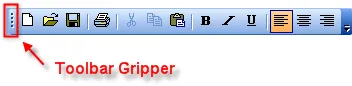
The code below removes the gripper from the menu bar and the first toolbar.
 'Remove gripper from the menu bar
 CommandBars.ActiveMenuBar.ModifyStyle XTP_CBRS_GRIPPER, 0

 'Remove gripper from the first toolbar.  Note that Commandbars(1)
 'is the menu bar
 CommandBars(2).ModifyStyle XTP_CBRS_GRIPPER, 0
 using XtremeCommandBars;

 //Remove gripper from the menu bar
 CommandBars.ActiveMenuBar.ModifyStyle(XTPCommandBarStyle.XTP_CBRS_GRIPPER, 0);

 //Remove gripper from the first toolbar.  Note that Commandbars[1]
 //is the menu bar
 CommandBars[2].ModifyStyle(XTPCommandBarStyle.XTP_CBRS_GRIPPER, 0);
Support Links
User Comments
No comments yet, sign in to comment.