
Call Us Today: (989) 472-4761
Guides & Tutorials
Guides and Tutorials
Keep Docking Panes from Drawing Over CommandBars
To keep the Docking Panes from drawing over top of the CommandBars you need to right-click on the docking pane control on your form and set "Send To Back" as in the picture below. The ComandBars object must be "in-front" of the DockingPane control:
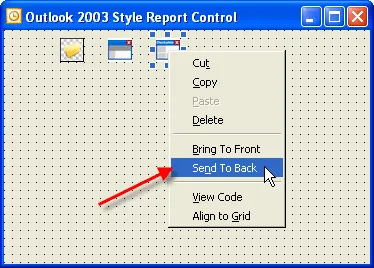
Next, add the code below to tell the docking panes that command bars are being used. SetCommandBars sets a CommandBars object to be associate with this DockingPane object. When using both DockingPanes and CommandBars in the same form, the CommandBars must be associated with the DockingPane control. This is necessary for correct resizing and layout of controls on the form.
DockingPaneManager.SetCommandBars Me.CommandBars
Support Links
User Comments
No comments yet, sign in to comment.