
Guides and Tutorials
Creating your own Expand Popup Menu
When the expand button is pressed, the default menu only allows the user to "Show More Buttons" and "Show Fewer Buttons." If you are using a translation, these menu items are not translated as well. You can create your own popup menu to override the default one in the ExpandButtonDown event. This not only allows you to add your own popup menu, but you can translate the text to the current local. This tutorial will show you how to create an expand menu similar to the one seen in Office 2003.
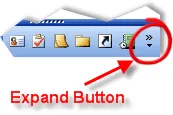
To start, you must set CancelMenu to True in the ExpandButtonDown event:
'The ExpandButtonDown event is fired when the ShortcutBar's
'expand button is clicked.
Private Sub wndShortcutBar_ExpandButtonDown(CancelMenu As Boolean)

    'Cancels the default menu that is displayed when the expand button is pressed.
    'The default button only displays the "Show More Buttons" and "Show Fewer
    'Buttons" commands.
    CancelMenu = True

    Dim Popup As CommandBar
    Dim Control As CommandBarControl
    Dim SubControl As CommandBarControl
    Dim i As Long
    Dim Item As ShortcutBarItem
In this sample we will use the CommandBars to create our expand menu. So we will need to add any icons to the CommandBars Icons collection.
    'Add the icons from the ShortcutBar to the Commandbars to
    'be used in the commandbar popup that will be created
    CommandBars.Icons.AddIcons wndShortcutBar.Icons
Then create a Popup Commandbar that will be used as the ShortcutBar's new expand button popup:
    'Creates a popup command bar we will use as the
    'ShortcutBar's expand button popup menu
    Set Popup = CommandBars.Add("Popup", xtpBarPopup)
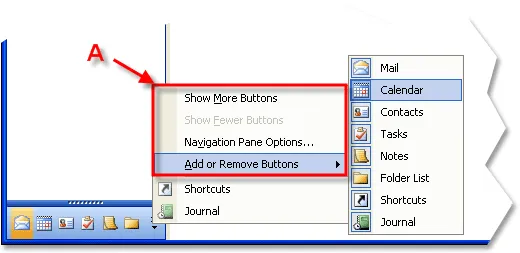
Now add some buttons to the popup menu. The picture below shows where these buttons will be displayed:
    'Adds buttons to the popup command bar, we will add a total
    'of 9 commands
    With Popup

        'Adds the "Show More Buttons" button
        Set Control = frmMain.AddButton(.Controls, xtpControlButton, _
                                        SHORTCUT_SHOW_MORE, "Show &More Buttons")
        'Enable this button if all buttons are not expanded
        Control.Enabled = (wndShortcutBar.ExpandedLinesCount <> 9)

        'Adds the "Show Fewer Buttons" button
        Set Control = frmMain.AddButton(.Controls, xtpControlButton, _
                                      SHORTCUT_SHOW_FEWER, "Show &Fewer Buttons")
        'Enable this button if there are 1 or more buttons expanded
        Control.Enabled = (wndShortcutBar.ExpandedLinesCount <> 1)

        'Adds the "Navigation Pane Options..." button as in Outlook 2003,
        'this will do nothing in our sample
        AddButton .Controls, xtpControlButton, SHORTCUT_NAVIGATE_PANE_OPTIONS, _
                                                    "Na&vigation Pane Options..."
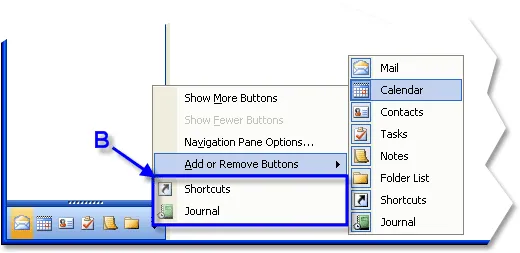
Now we will add the popup button that contains a button for each of the ShortcutBar items. These buttons will be used to hide\show the corresponding item in the ShortcutBar. The picture below shows where these items will be displayed:
        'Adds the "Add or Remove Buttons" popup menu.  This popup will
        'contain a button that corresponds to each item that is in the
        'ShortcutBar.  The buttons will allow you to hide\show items
        'in the ShortcutBar
        Set Control = AddButton(.Controls, xtpControlButtonPopup, _
                           SHORTCUT_ADD_REMOVE_BUTTONS, "&Add or Remove Buttons")

        'Adds a button for each shortcutbar item to the
        '"Add or Remove Buttons" popup menu
        For Each Item In wndShortcutBar
            If Not Item.Id = -1 Then
                With Control.CommandBar
                    Set SubControl = AddButton(.Controls, xtpControlButton, _
                                                           Item.Id, Item.Caption)
                    SubControl.IconId = Item.Id

                    'set the button as "checked" if the Item is
                    'currently visible in the Shortcutbar
                    SubControl.Checked = Item.Visible
                End With
            End If
        Next
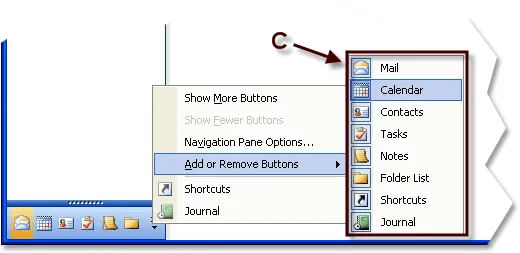
The last part of the popup will contain a quick link to all of the ShortcutBar items that are currently hidden. The picture below shoes where these items are displayed:
        Dim BeginGroup As Boolean
        BeginGroup = True

        'Adds all hidden shortcut bar buttons to the popup menu
        'This will give you access to the buttons not currently
        'displayed in the ShortcutBar
        For Each Item In wndShortcutBar
            'If shortcut bar item is hidden, then add it to the popup menu
            If (Item.Hidden) Then
                AddButton .Controls, xtpControlButton, Item.Id, Item.Caption, _
                                                                       BeginGroup
                BeginGroup = False
            End If
        Next

    End With
Next you will add the message handling from the popup menu:
    End With

    'stores the ID of the selected control from the expand button popup menu.
    Dim nCommand As Long

    'Displays the expand button popup.  Control will not pass
    'back to the code until the popup menu is closed.
    'Passing TPM_RETURNCMD into ShowPopup will cause the ID of the control to
    'be returned when a control in the popup is clicked. When using the
    'TPM_RETURNCMD parameter, the CommandBars_Execute event does not fire
    'because the ID of the control is returned instead.
    nCommand = Popup.ShowPopup(TPM_RETURNCMD)

    'Popup is closed and the user did not select anything, they might have
    'click on something other than the popup menu
    If (nCommand = 0) Then Exit Sub

    'A control was selected from the popup menu. Determines which control
    'was selected.
    Select Case (nCommand)
        Case SHORTCUT_INBOX To SHORTCUT_JOURNAL
            'Hides or displays the ShortcutBar item that was clicked
            wndShortcutBar.FindItem(nCommand).Visible = _
                                   Not wndShortcutBar.FindItem(nCommand).Visible

        Case SHORTCUT_SHOW_MORE:
            'Expands the Shortcut list by 1
            wndShortcutBar.ExpandedLinesCount = _
                                           wndShortcutBar.ExpandedLinesCount + 1

        Case SHORTCUT_SHOW_FEWER:
            'Collapses the Shortcut list by 1
            wndShortcutBar.ExpandedLinesCount = _
                                           wndShortcutBar.ExpandedLinesCount - 1

        Case SHORTCUT_NAVIGATE_PANE_OPTIONS:
            Debug.Print "Navigate Pane Options Clicked"
    End Select

End Sub
Below is the complete code for the ExpandButtonDown event:
'The ExpandButtonDown event is fired when the ShortcutBar's
'expand button is clicked.
Private Sub wndShortcutBar_ExpandButtonDown(CancelMenu As Boolean)

    'Cancels the default menu that is displayed when the expand button is pressed.
    'The default button only displays the "Show More Buttons" and "Show Fewer
    'Buttons" commands.
    CancelMenu = True

    Dim Popup As CommandBar
    Dim Control As CommandBarControl
    Dim SubControl As CommandBarControl
    Dim i As Long
    Dim Item As ShortcutBarItem

    'Add the icons from the ShortcutBar to the Commandbars to
    'be used in the commandbar popup that will be created
    CommandBars.Icons.AddIcons wndShortcutBar.Icons

    'Creates a popup command bar we will use as the
    'ShortcutBar's expand button popup menu
    Set Popup = CommandBars.Add("Popup", xtpBarPopup)

    'Adds buttons to the popup command bar, we will add a total
    'of 9 commands
    With Popup

        'Adds the "Show More Buttons" button
        Set Control = frmMain.AddButton(.Controls, xtpControlButton, _
                                        SHORTCUT_SHOW_MORE, "Show &More Buttons")
        'Enable this button if all buttons are not expanded
        Control.Enabled = (wndShortcutBar.ExpandedLinesCount <> 9)

        'Adds the "Show Fewer Buttons" button
        Set Control = frmMain.AddButton(.Controls, xtpControlButton, _
                                      SHORTCUT_SHOW_FEWER, "Show &Fewer Buttons")
        'Enable this button if there are 1 or more buttons expanded
        Control.Enabled = (wndShortcutBar.ExpandedLinesCount <> 1)

        'Adds the "Navigation Pane Options..." button as in Outlook 2003,
        'this will do nothing in our sample
        AddButton .Controls, xtpControlButton, SHORTCUT_NAVIGATE_PANE_OPTIONS, _
                                                    "Na&vigation Pane Options..."

        'Adds the "Add or Remove Buttons" popup menu.  This popup will
        'contain a button that corresponds to each item that is in the
        'ShortcutBar.  The buttons will allow you to hide\show items
        'in the ShortcutBar
        Set Control = AddButton(.Controls, xtpControlButtonPopup, _
                           SHORTCUT_ADD_REMOVE_BUTTONS, "&Add or Remove Buttons")

        'Adds a button for each shortcutbar item to the
        '"Add or Remove Buttons" popup menu
        For Each Item In wndShortcutBar
            If Not Item.Id = -1 Then
                With Control.CommandBar
                    Set SubControl = AddButton(.Controls, xtpControlButton, _
                                                           Item.Id, Item.Caption)
                    SubControl.IconId = Item.Id

                    'set the button as "checked" if the Item is
                    'currently visible in the Shortcutbar
                    SubControl.Checked = Item.Visible
                End With
            End If
        Next

        Dim BeginGroup As Boolean
        BeginGroup = True

        'Adds all hidden shortcut bar buttons to the popup menu
        'This will give you access to the buttons not currently
        'displayed in the ShortcutBar
        For Each Item In wndShortcutBar
            'If shortcut bar item is hidden, then add it to the popup menu
            If (Item.Hidden) Then
                AddButton .Controls, xtpControlButton, Item.Id, Item.Caption, _
                                                                       BeginGroup
                BeginGroup = False
            End If
        Next

    End With

    'stores the ID of the selected control from the expand button popup menu.
    Dim nCommand As Long

    'Displays the expand button popup.  Control will not pass
    'back to the code until the popup menu is closed.
    'Passing TPM_RETURNCMD into ShowPopup will cause the ID of the control to
    'be returned when a control in the popup is clicked. When using the
    'TPM_RETURNCMD parameter, the CommandBars_Execute event does not fire
    'because the ID of the control is returned instead.
    nCommand = Popup.ShowPopup(TPM_RETURNCMD)

    'Popup is closed and the user did not select anything, they might have
    'click on something other than the popup menu
    If (nCommand = 0) Then Exit Sub

    'A control was selected from the popup menu. Determines which control
    'was selected.
    Select Case (nCommand)
        Case SHORTCUT_INBOX To SHORTCUT_JOURNAL
            'Hides or displays the ShortcutBar item that was clicked
            wndShortcutBar.FindItem(nCommand).Visible = _
                                   Not wndShortcutBar.FindItem(nCommand).Visible

        Case SHORTCUT_SHOW_MORE:
            'Expands the Shortcut list by 1
            wndShortcutBar.ExpandedLinesCount = _
                                           wndShortcutBar.ExpandedLinesCount + 1

        Case SHORTCUT_SHOW_FEWER:
            'Collapses the Shortcut list by 1
            wndShortcutBar.ExpandedLinesCount = _
                                           wndShortcutBar.ExpandedLinesCount - 1

        Case SHORTCUT_NAVIGATE_PANE_OPTIONS:
            Debug.Print "Navigate Pane Options Clicked"
    End Select

End Sub
User Comments
No comments yet, sign in to comment.