
Call Us Today: (989) 472-4761
Guides & Tutorials
Guides and Tutorials
Adding a docking pane to your application
The following is a tutorial on how to create an MDI application with Docking Pane using the Visual Studio 6.0 Application Wizard. The same technique can be used for later versions of Visual Studio . NET as well.
Create a simple MDI application using the MFC AppWizard:
- From Visual Studio select ‘File’ then ‘New’ and select the ‘Projects’ tab.
- Choose MFC Appwizard(exe) as your project type and enter ‘MDISample’ as the project name.
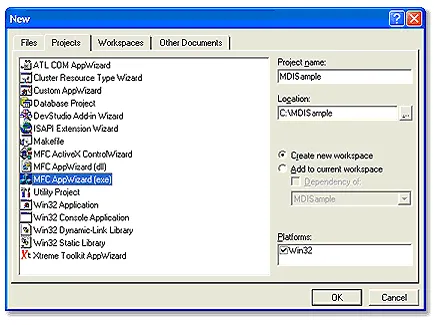
- For the first step, make sure that "Multiple documents" is selected then press the ‘Finish’ button.
Add Empty Docking Pane
-
Add the following line to your StdAfx.h file:
Toolkit Pro users:#include <XTToolkitPro.h> // Toolkit Pro components
Docking Pane users:#include <XTDockingPanePro.h> // Docking Pane components
- Add CXTPDockingPaneManager member to CMainFrame class.
 // Attributes
 public:
     CXTPDockingPaneManager m_paneManager;
- Add string resources for the titles of the future panes
IDR_PANE_OPTIONS 61446 "Options" PROPERTIES 61447 "Properties" - Add following to CMainFrame::OnCreate.
     // Initialize the docking pane manager and set the
     // initial them for the docking panes.  Do
     // this only after all control bars objects have been
     // created and docked.
     m_paneManager.InstallDockingPanes(this);
     m_paneManager.SetTheme(xtpPaneThemeOffice);

     // Create docking panes.
     CXTPDockingPane* pwndPane1 = m_paneManager.CreatePane(
         IDR_PANE_OPTIONS, CRect(0, 0,200, 120), dockLeftOf);
     CXTPDockingPane* pwndPane2 = m_paneManager.CreatePane(
         IDR_PANE_PROPERTIES, CRect(0, 0,200, 120),
             dockBottomOf, pwndPane1);
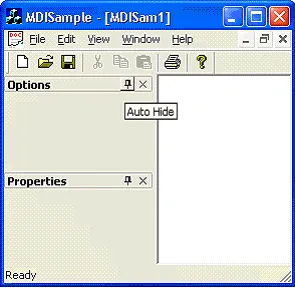
Attach CWnd derived class to the panes:
- Add Cwnd derived class as member of CMainFrame.
// Attributes
public:

    CStatic m_wndOptions;
    CEdit m_wndProperties;
    </pre>

        <li>Add OnDockingPaneNotify handler.</li>
        <pre class="code">
        BEGIN_MESSAGE_MAP(CMainFrame, CMDIFrameWnd)
            //{{AFX_MSG_MAP(CMainFrame)
            ON_WM_CREATE()
            //}}AFX_MSG_MAP
            ON_MESSAGE(XTPWM_DOCKINGPANE_NOTIFY,
                OnDockingPaneNotify)
        END_MESSAGE_MAP()

        LRESULT CMainFrame::OnDockingPaneNotify(WPARAM
            wParam, LPARAM lParam)
    {
        if (wParam == XTP_DPN_SHOWWINDOW)
        {
            CXTPDockingPane* pPane =
                    (CXTPDockingPane*)lParam;

        if (!pPane->IsValid())
        {
            switch (pPane->GetID())
            {
            case IDR_PANE_PROPERTIES:
                {
                    if (
                    m_wndProperties.GetSafeHwnd() == 0)
                    {
                        m_wndProperties.Create(WS_CHILD|
                            ES_AUTOVSCROLL|ES_MULTILINE,
                            CRect(0, 0, 0, 0), this, 0);
                    }
                    pPane->Attach(&m_wndProperties);
                    break;
                }
            case IDR_PANE_OPTIONS:
                {
                    if (m_wndOptions.GetSafeHwnd() == 0)
                    {
                        m_wndOptions.Create(_T("\n\nOptions"),
                            WS_CHILD|WS_CLIPCHILDREN|
                            WS_CLIPSIBLINGS|SS_CENTER,
                            CRect(0, 0, 0, 0), this, 0);
                    }
                    pPane->Attach(&m_wndOptions);
                    break;
                }
            }
            }
            return TRUE;
        }
        return FALSE;
    }
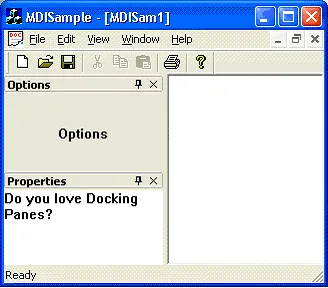
Add image to pane.
- Create Bitmap with icons for created panes:
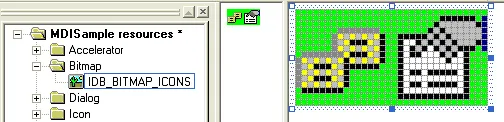
- Add to CMainFrame::OnCreate.
     nt nIDIcons[] = {IDR_PANE_OPTIONS, IDR_PANE_PROPERTIES};
     m_paneManager.SetIcons(IDB_BITMAP_ICONS, nIDIcons,
         _countof(nIDIcons), RGB(0, 255, 0));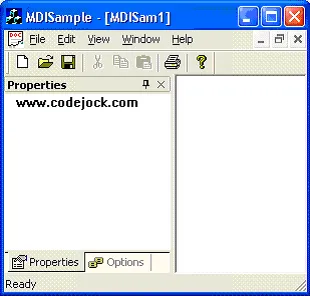
Add Save/Load State
- Add following to the OnCreate function for CMainFrame. This will restore the previous state of docking panes.
int CMainFrame::OnCreate(LPCREATESTRUCT lpCreateStruct)
{
    ...

        // Load the previous state for docking panes.
        CXTPDockingPaneLayout layoutNormal(&m_paneManager);
    if (layoutNormal.Load(_T("NormalLayout")))
    {
        m_paneManager.SetLayout(&layoutNormal);
    }
    return 0;
}
- Add the OnClose message handler to CMainFrame and the following before the call to the base class. This will save the current state of your docking pane.
void CMainFrame::OnClose()
{
    // Save the current state for docking panes.
    CXTPDockingPaneLayout layoutNormal(&m_paneManager);
    m_paneManager.GetLayout(&layoutNormal);
    layoutNormal.Save(_T("NormalLayout"));
    CMDIFrameWnd::OnClose();
}
Support Links
User Comments
No comments yet, sign in to comment.