
Guides and Tutorials
A Guide To MSDN Integration (Visual Studio 6.0)
If you are like me, the lack of documentation can be quite frustrating. It's not enough that you have spent hundreds of hours building your code and polishing your application. Now you have to search endlessly trying to find the answer to a question that should already be documented...somewhere...but is not! That is what I ran into when trying to integrate HTML Help with the MSDN Collection. I finally figured this one out after endless hours of research. Hopefully my frustration and research will benefit those of you who are looking for help with this topic.
Getting Started
MSDN stores information about the HTML help files that it will use in what is known as a "collection". A collection is an XML formatted file that contains information about each help file to be used with MSDN. There are two files that the collection uses, msdnxxx.col and hhcolreg.dat. The msdnxxx.col file is the actual collection. This contains a list of all of the html help titles that are to be used with the collection. The name of this file typically begins with "msdn" and ends in ".col". The October 2000 collection file name is MSDN030.COL. The hhcolreg.dat file is the collection's registry. This file stores specific details about each collection title such as the location of the HTML help, index files, and version number. The first thing we will need to do is locate both of these files.
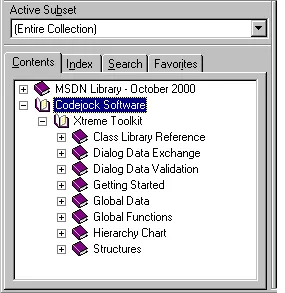
Locating the msdnxxx.col file
We will need to look in the system registry to find the location of the msdnxxx.col file, you can use regedit for this. If you have the MSDN Library installed you will find the following key:
HKEY_LOCAL_MACHINE\SOFTWARE\Microsoft\HTML Help Collections\Developer Collections
This is where Microsoft stores the location of its help collections. Under this key you will notice an entry for Language. The value for this key specifies which language the collection is using. A typical value would be 0x0409 for English, but may vary depending on your language settings. The next key you will find is Preferred. This value tells us which collection is currently the preferred collection for use by MSDN. A typical value for this would be 0x039a24110 but may also vary. Under this key we will find an entry for Filename. This value is the actual location on your hard drive where the msdnxxx.col file is located.
Locating the hhcolreg.dat file
The next file we need to be concerned with is hhcolreg.dat. Like the collection file, this also is a XML formatted file and contains specific information about your integrated help files. In older releases of the MSDN Library, this file was located in the Windows\Help directory. In later releases this has been moved to .\Documents and Settings\All Users\Application Data\Microsoft\HTML Help\. Beginning with version 4.71 of the shell32.dll we can make a call SHGetSpecialFolderPath(...) using the CSIDL_COMMON_APPDATA flag. However depending on the version of Internet Explorer, this function may have been moved to ShFolder.dll. For this reason, we have created our own version of the function called GetSpecialFolderPath(...). We can also use the collectionnum tag found in msdnxxx.col to determine which directory the hhcolreg.dat is found. Typically if this value is less than 10000 then the file is located in the Windows/Help directory.
Editing the collection file
Now that we have located both the msdnxxx.col and hhcolreg.dat files, we need to examine these files in order to integrate our data correctly. The first file we are going to look at is the msdnxxx.col file. Using a text editor, open this file. You will see two tags at the beginning of the file masterlangid and collectionnum. These are very important in our integration. The masterlangid tag tells us which language the collection is using and the collectionnum tag indicates which collection we are working with. A typical value for these tags would be:
<masterlangid value=1033/><collectionnum value=10001/>
Each entry in the collection will begin with a <Folder> tag and end a </Folder>. There are three values that you should be concerned with. Two of them will be TitleString tags and one LangId tag. The first TitleString tag value is what you would see when you select the "Contents" tab when running HTML help. The second TitleString tag value is our collection identifier. This value must be unique to the collection will be used in the hhcolreg.dat file as well. The third tag value is LangId. This value will be set to the masterlangid tag value that was found at the beginning of the file.
Here is what a typical collection entry might look like:
<Folder>
    <TitleString value="Codejock Software"/>
    <FolderOrder value=2/>
    <Folder>
        <TitleString value="=xtreme_toolkit"/>
        <FolderOrder value=1/>
        <LangId value=1033/>
    </Folder>
</Folder>
Editing the registry file
Next we are going to update the hhcolreg.dat file. Open the file with a text editor. You will notice that each entry begins with a <DocCompilation> tag and ends with a </DocCompilation>. There are six tags that we should be concerned with here. The DocCompId tag contains the same value as the second TitleString value mentioned in the collection. This value is unique to the collection and must match exactly! The DocCompLanguage tag contains the same value as the LangId value mentioned in the collection. This value must match the masterlangid tag. The ColNum tag is the collection number. This value must match collectionnum tag found in msdnxxx.col. The TitleLocation tag contains the full path to where your *.chm file is located. The IndexLocation tag contains the full path to where your *.chi file is located. The last tag is the Version tag. This is the current version of your help file.
Here is what a typical registry entry might look like:
<DocCompilation>
    <DocCompId value="xtreme_toolkit"/>
    <DocCompLanguage value=1033/>
        <LocationHistory>
        <ColNum value=10001/>
        <TitleLocation value="[full path]Xtreme.chm"/>
        <IndexLocation value="[full path]Xtreme.chi"/>
        <LocationRef value=""/>
        <Version value=2/>
    </LocationHistory>
</DocCompilation>
Getting it all to work
You will need to generate a .chi index and a binary table of contents when you compile your HTML help file. Both are requirements for use with MSDN collections. To do this, you will need to add "Create CHI file=Yes" and "Binary TOC=Yes" to your .hhp file under the [OPTIONS] section. It is also recommended that you place your .chm and .chi files in the MSDN collection directory, but this is not a requirement for your collection to work properly. After you have completed editing the collection files, open the MSDN Library collection. Select the index tab to generate the index for your help title. A dialog will appear informing you that your index is being generated.
Tools for creating HTML help
Before you begin the journey into MSDN integration, first you will need to create your HTML help files. In order to do this you must have HTML Help Workshop installed on your machine. This program is what will compile your HTML files into a .chm file. This program is free and can be downloaded from Microsoft.
I have also found an excellent utility that has saved me literally hundreds of hours when creating html help documentation. I would highly recommend you check out the FAR application created by the Helpware Group. This shareware application is very reasonably priced and can be downloaded by following this link.
The MSDN Integration Utility
Well if after all of that if you are completely confused, don't worry, we have an Ace up our sleeves...the MSDN Collection Integration Utility! This program will actually integrate your HTML help files for you! Browse to the location of your .chm and .chi files, supply the title string to be used in the collection, and define a unique identifier to be used for your help files. You can use any string you desire for the unique id, however the safest approach would be to use a GUID to ensure uniqueness. You can create one automatically by pressing the "Gen. GUID" button. You also have the option to set the version label for your help as well. Once you have defined the required fields, the utility will take care of the rest by pressing the "Integrate with MSDN collection" button!
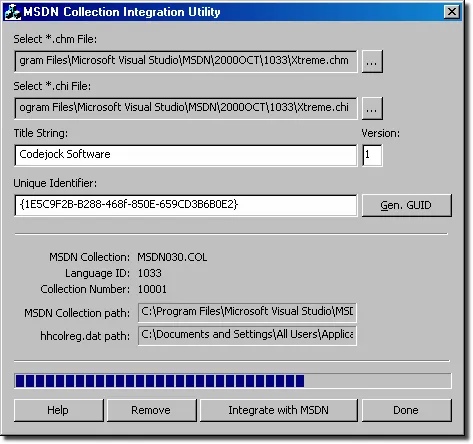
You can download the executable and the complete project source code. All of the integration code has been encapsulated into a single class CMSDNIntegration. You can use this class with any MFC application to create your own integration utility. Included with the download is a HTML help file that you can use to test the program with. The help file is a complete reference for the CMSDNIntegration and CLoadLibrary class. The CLoadLibrary class is a wrapper that is used for loading dll's and determining the version number.
...enjoy!
User Comments
No comments yet, sign in to comment.