
Call Us Today: (989) 472-4761
Guides & Tutorials
Guides and Tutorials
Using 24-bit Color Toolbars
If you want to add hot toolbar buttons like the ones seen in internet explorer, it is pretty straight forward. This approach will work for both Visual C++ 5 and 6, however you may want to read up on the enhancements to the toolbar class for VC 6.0.
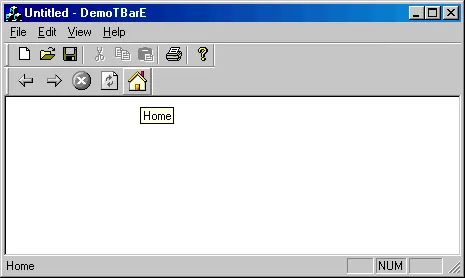
After your toolbar has been created in CMainFrame::OnCreate(), you will need to add the following code, assuming that you have two bitmap resources already created IDB_TOOLBAR_COLD for normal, and IDB_TOOLBAR_HOT for hot buttons:
// Set up hot bar image lists.
CImageList imageList;
CBitmap    bitmap;

// Create and set the normal toolbar image list.
bitmap.LoadBitmap(IDB_TOOLBAR_COLD);
imageList.Create(21, 20, ILC_COLORDDB|ILC_MASK, 13, 1);
imageList.Add(&bitmap, RGB(255,0,255));
m_hotToolBar.SendMessage(TB_SETIMAGELIST,
                    0, (LPARAM)imageList.m_hImageList);
imageList.Detach();
bitmap.Detach();

// Create and set the hot toolbar image list.
bitmap.LoadBitmap(IDB_TOOLBAR_HOT);
imageList.Create(21, 20, ILC_COLORDDB|ILC_MASK, 13, 1);
imageList.Add(&bitmap, RGB(255,0,255));
m_hotToolBar.SendMessage(TB_SETHOTIMAGELIST,
                    0, (LPARAM)imageList.m_hImageList);
imageList.Detach();
bitmap.Detach();
The send message portion of the code has been wrapped into a CToolBarCtrl() function call for Visual C++ 6. If you will notice, I have used 24 bit color images with the toolbar shown here, so you are not limited to just 16 colors.
Support Links
User Comments
No comments yet, sign in to comment.