Developer Downloads
Application Skins and Visual Styles
Download application skins and visual styles for Codejock Skin Framework to give Visual C++ and ActiveX applications a polished Windows interface.
How To Use Microsoft® Visual Styles with Skin Framework
With Microsoft® Visual Style support already built in you are not limited to pre-defined skins
that are provided with the control. You can use any *.msstyles dll from any Visual Style developed for use with Windows XP or later themes.
To use Microsoft® Visual Styles with the Skin Framework you will first need to download a Visual Style.
The Skin Framework only needs to use a *.msstyles dll, any other files that might be included with the Visual Style are not required
by Skin Framework.
Framework Visual Styles
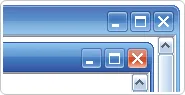
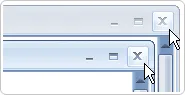
The Skin Framework provides three Visual Styles which are shipped with the product. These styles are ports of Microsoft® Windows XP Luna skin, Microsoft®
Windows Media Center Royale skin and Office 2007 skin. Below is a preview of the default skins that are provided with Skin Framework.
| Windows XP |
|
 |
| Media Center |
|
 |
| Office 2007 |
|
 |
3rd Party Visual Styles
In addition to the default skins that are shipped with Skin Framework, we have also provided some links to Visual Styles that were created by 3rd party
authors along with links to the site where you can download the Visual Style. It is important to note that these authors are in no way affiliated with Codejock
Software, which means you can use these Visual Styles for testing purposes, however you will need to contact the author first to obtain permission before you
use them in a product release.


